On a secure defence site, two things are true at once, and together they break most verification tools. The site has no signal, and the 3D model is too sensitive to sit on a public cloud. This is how to check the build against the model without the model ever leaving the site.
WHY A SECURE SITE BREAKS MOST TOOLS
| No signal on site | You cannot upload the model or a scan |
| The model is classified | It cannot leave the perimeter or touch a public cloud |
| Tolerances are tight | A few centimetres can compromise a hardened structure |
You still have to know whether the build matches the design. The usual answer, upload the model, compare it to a scan in the cloud, and read the report, is simply not available. DeltaARBIM approaches this the same way it approaches all on-site BIM validation, on the device and against the real structure, but here that has to happen without anything leaving the site.
Why defence verification is a different problem
On a normal commercial job, a services clash is a cost and schedule problem. On a defence build it is that too, but with three extra constraints that change the whole approach.
The model is a security asset, so what is cheap to share on a commercial site is classified here and cannot be handled on infrastructure you do not control. The site has no connectivity, because secure areas routinely have no signal and no cloud access by design.
And the tolerances are tight, so a few centimetres out can compromise a hardened structure, not just create rework. On top of that, access is need-to-know: a contractor should see only the zone they are building, never the whole facility.
What security-minded actually means
The framework the sector works to is ISO 19650-5, the standard for security-minded information management. In plain terms it asks for four things.
Run a sensitivity and risk assessment, so you know which parts of the model are high-risk and who may see them. Keep classified and unclassified information distinct, often called red and black separation, and break the model up by zone. Host the data in a secure, often air-gapped, common data environment on local hardware cut off from the public internet.
And control access per person, so viewing and exporting are limited to a user's trade. The point of all of it is that information is managed so it cannot leak, and verification has to respect that, not work around it.
Why cloud-based verification fails here
Most on-site verification workflows assume you can upload something, the model, the scan, or both, to a cloud service and compare it there. On a secure site that fails twice over. There is no connectivity to upload in the first place, and even if there were, the data is not allowed off the perimeter. A tool that depends on the internet does not just run slowly here. It is a non-starter.
The build still drifts from the drawing, the same way it does everywhere, but the usual way of catching it is off the table.
How to verify offline, with nothing leaving the perimeter
The method that works is on-device and fully offline. It comes down to four steps.
01 · PUT THE MODEL ON THE DEVICE
Load the IFC model onto the tablet or phone that goes to site, with no cloud round-trip.
02 · ANCHOR IT WITH LIDAR
LiDAR anchors the model to the structure, so no markers are needed to start and no external infrastructure is added to a secure area. For repeat inspections, a QR marker printed on site brings the model back.
03 · WALK AND CHECK
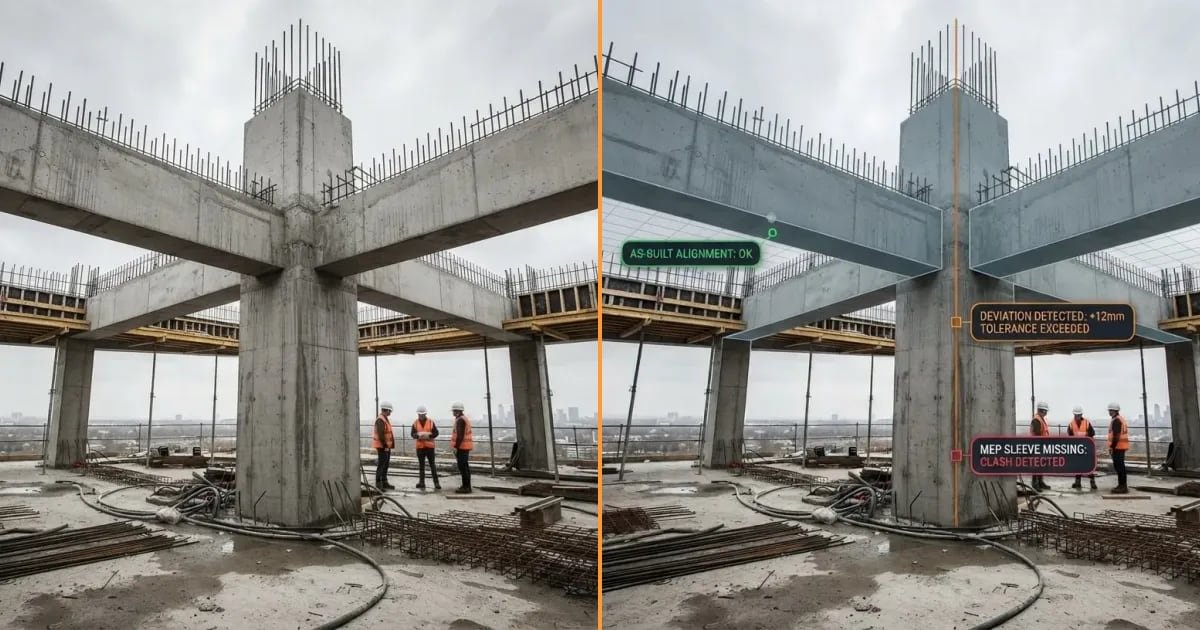
The model is drawn over the real build. Compare structure, walls, and services against the design to within 2 cm.
04 · KEEP THE DEVIATIONS LOCAL
Flag whatever does not match, tagged to its exact place in the model, and hold the record inside your own environment. A self-hosted setup means the models and results never leave your systems. This is the core of defence BIM validation done right.
That is offline, air-gapped verification. It aligns with the principles of ISO 19650-5 rather than routing around them, because nothing sensitive ever touches a network you do not own.
What good looks like
A verification approach that suits defence is offline, self-hosted, scope-limited so a contractor sees only their zone, marker-free, and accurate to 2 cm. None of it is exotic, and BIM is already standard on defence infrastructure. Public examples from other organisations include US Air Force MILCON projects, US Army Corps of Engineers barracks pilots, and the UK Ministry of Defence's Project Allenby/Connaught, delivered under DEFCON 687b common working environments.
The direction of travel is clear: models on site, checked against reality, without compromising security.
Where DeltaARBIM fits
DeltaARBIM is the on-site verification layer for exactly this situation. It runs fully offline on the device, with a self-hosted option so nothing leaves the perimeter, scope-limited access in line with red and black separation, no markers, and accuracy to 2 cm.
It is not a replacement for your common data environment or your accreditation process. It is how you check the build against the model on a site that cannot go online.
See it run with the network switched off.
Offline, self-hosted, and accurate to 2 cm. Bring your own model and we will show you what does not match, without a single byte leaving the site.
Book a free demo